


MyChart Hospital Stay
Using MyChart During Your Hospital Stay or Emergency Visit

MyChart is designed to give you an enhanced experience to help you stay even more informed and connected during your hospital stay or emergency visit. You and your loved ones can:
- View test, lab or imaging results faster
- View medications and upcoming scheduled procedures in real time
- Access educational information related to your condition
- See your care team
- And more!
Getting Started
If you're in the hospital now or visiting the emergency room:
- Sign in to the MyChart app on your iPhone or Android device or for new users, download MyChart and create an account
- You will see "View Hospital Stay"
Once you’re admitted to one of our hospitals or seen in the emergency department, MyChart enhancements will automatically be available in your app, so you can stay connected to your care every step of the way.
Need help logging in? Call our support line 7 days a week from 7:00 a.m. - 7:00 p.m. at 844-982-4278.

View Your Chart
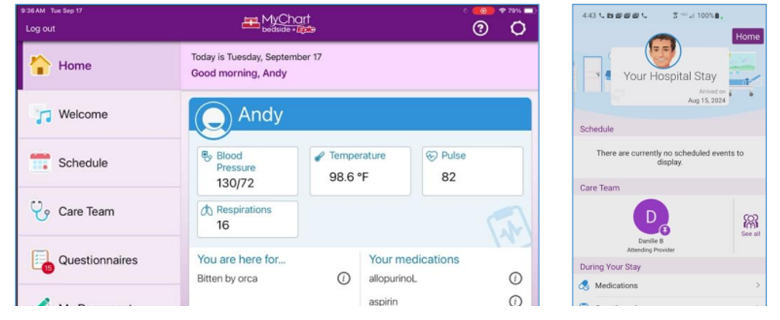
See your vitals, lab results and doctors' notes. Most test results are released to your account as soon as the results are available.

Plan Your Day
See your upcoming appointments and let our staff know about events like family visits.

Put Names to Faces
Get to know your care team members and see how each person helps take care of you.

Learn About Your Care
Learn more about your diagnoses, medications and lab results with personalized education and reference
information.

Record Notes for Later
Take notes, audio recordings and videos. You can review them later in MyChart.
Take Care of Your Children and Other Family Members
As a patient's proxy, you can help your loved one during their hospital stay with access to their appointments, care team, health information, questionnaires and more.
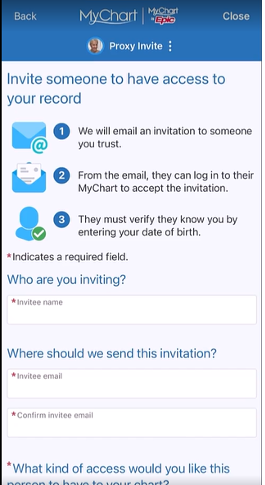
Invite Someone to Access MyChart During Your Stay
If you’d like to give a loved one access to use MyChart on your behalf (such as a parent, spouse, or caregiver) they’ll need authorized access to your MyChart account through Friends and Family Access.
Click the menu in MyChart and select "Sharing Hub" to grant access.
They will need to accept the invitation for access and then they will have the option to toggle between their own MyChart account and yours.