



MyChart
With the Trinity Health MyChart patient portal, staying connected to your health has never been easier. Our online portal offers you a simple way to manage your health care. MyChart is secure and available 24/7 from your phone, tablet or computer.

Everything you need in one place.
WHAT YOU CAN DO:
Manage Appointments
Schedule, cancel or view upcoming or past appointments
View Health Information
Review medications, test results and health history.
Renew Prescriptions
Request refills for your medications.
Pay Your Bills Online
View and pay your medical bills online.
Send and Receive Messages with Your Care Team
Send a message to ask your doctor.
Download Your Health summary
Download a summary of your current health information.
MyChart Hospital Stay
Using MyChart During Your Hospital Stay or Emergency Visit
Stay even more informed and connected:
- Get quicker access to your test, lab, and imaging results
- View medications and upcoming procedures as they’re scheduled
- Explore educational resources tailored to your condition
- Connect with and view your care team details
- Plus much more!
How to Begin
- Sign in to the MyChart app on your iPhone or Android device or for new users, download MyChart and create an account
- You will see "View Hospital Stay"
Invite Someone to Access
MyChart During Your Stay
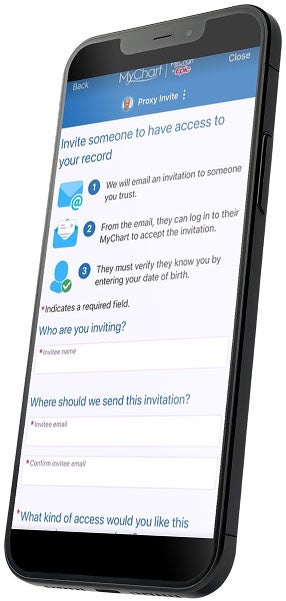
If you'd like to give a loved one access to use MyChart on your behalf (such as a parent, spouse, or caregiver) they'll need authorized access to your MyChart account. Click the menu in MyChart and select "Sharing Hub" to grant access to a caregiver. The caregiver will need to accept the invitation for access and then they will have the option to toggle between their own MyChart account and yours.
At Trinity Health
Your health provider is a part of Trinity Health, a mission-based health system with 92 hospitals across the nation, which includes eight hospitals, 16 health centers and more than 3,600 physicians in Michigan
Sign Up NowFAQs
If you have questions about MyChart, your health information or how to access your previous portal, please visit our FAQ page
Protect your privacy and stay alert to phishing scams by learning how to recognize fraudulent MyChart messages and protect your personal information: MyChart Safety Tips